 Disclaimer: I am a sighted user with perfect vision. I only used iOS VoiceOver and a bit of Android TalkBack.
A month ago I decided to try VoiceOver, an iOS screen reader built into iOS. I made it my objective to use my phone with Screen Curtain on for a bit (which turns off the screen while still letting you interact) to simulate complete blindness.
It quickly became apparent to me that the experience of using a screen reader is still very rough in 2026, even on Apple’s iOS which I had always heard good things about in terms of accessibility.
Accessible interaction 
VoiceOver works by changing how you interact with user interfaces. For example, instead of tapping on elements you see on the screen, you first highlight an element, and then double-tap to interact with it.
At the most basic level navigation is done by going through each element one by one in order defined by software or page—usually left-to-right and top-to-bottom for LTR layouts,—and double-tapping for interaction. Every selection is read out with a synthesised voice. There are shortcuts like navigating by line, jumping to headings, or holding and moving your finger on the screen to kind of ‘scan’ the content under your finger.
Typing on a virtual keyboard can be done with one of the three methods you get to choose from:
-
First is Standard Typing, in which you navigate through the keyboard keys like any other element on the screen and double-tap to confirm a key press. It’s very slow.
-
Second method is Touch Typing, in which you perform hold-and-move ‘scanning’ gesture over keys to find the right one, and then release to input that letter. It’s way faster, and also allows swipe-typing with an even longer hold.
-
Last method is Direct Touch Typing, in which you can use the keyboard the same way a sighted user would.
I went with Touch Typing. I wanted to switch to Direct Touch Typing, but it appears to be broken in the latest iOS version, making the keyboard completely unusable.
If I was blind and unable to use the virtual keyboard without VoiceOver, I’d probably invest into a physical keyboard for my phone, as well as a refreshable Braille display.
Braille 
Refreshable Braille displays are not only output devices for tactile Braille, but are—oftentimes—also input devices.
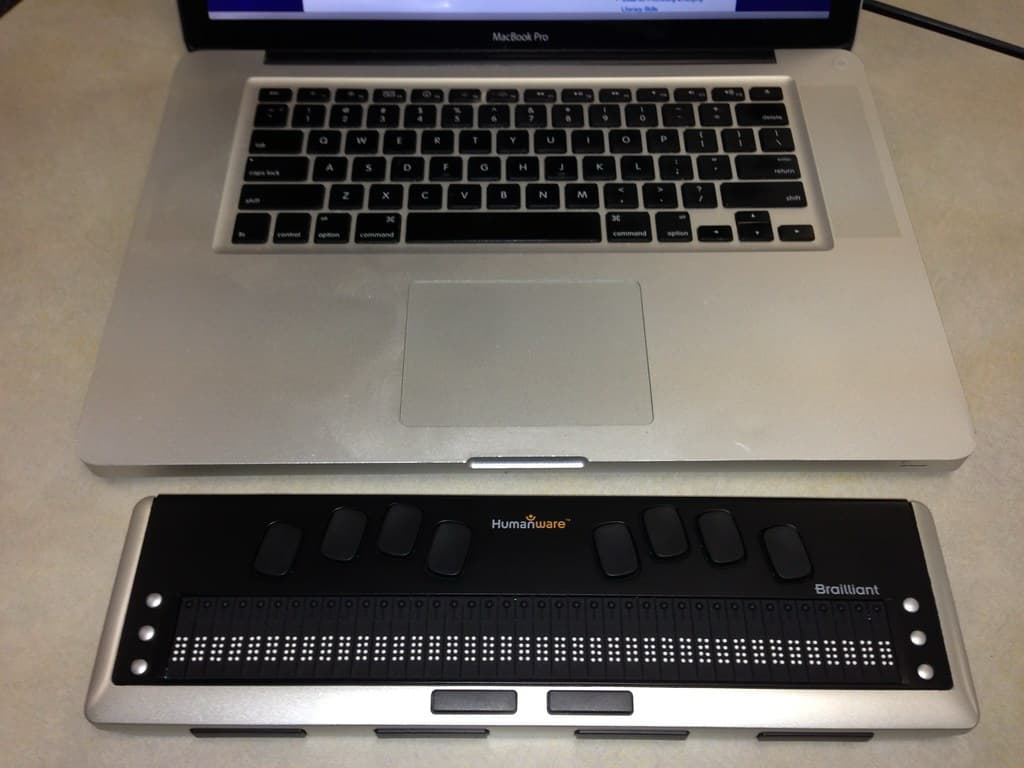
Image credit: George Williams on flickr
iOS is compatible with Braille displays. It also has Braille input mode with 6 dot buttons. Additionally, all VoiceOver gestures are available in this mode as special command cells, e.g. a cell with dots 3-6 interacts with a selected element, or dots 1-2-5 sends you to Home Screen.
I learned a bit of Braille with no contractions (grade one Braille). Even though I’m very slow at typing and understanding text, it’s very fun. In fact, I wrote this and last paragraphs entirely using Braille input.
One thing to mention: I don’t have an actual Braille Display. I do have very limited experience of touching embossed signs with Braille writing on them many years ago, but I couldn’t at all tell which dots were raised and which ones weren’t, so I can imagine learning to recognise cells by touch would take me quite a lot of time.
Problems 
While I am confident I could use my phone if I was completely blind, my experience of using this feature wasn’t without a large amount of bugs and lack of accessible interfaces in apps.
Some of the problems had to do with speech synthesis. Sometimes the voice drops out for a second, very occasionally it outright does not read what it’s supposed to, other times it suddenly stops reading.
Navigation often resets to the beginning of a page without any input from me, or I find myself in situations where I can’t figure out how to navigate out of some group of elements without tap-and-hold gesture.
Some applications do not have accessibility in mind, and some outright do not work with VoiceOver. VoiceOver has Screen Recognition for such cases, but it is still much much worse than native support.
Apps 
Discord is an example of an app with middling accessibility. It is navigable with VoiceOver, supports alt-text on images, it even has proper labelling of a lot of elements. Unfortunately, navigable does not mean easy to navigate.
For every message group it first reads the sender, then a message being replied to, then the messages themselves, then—for some unknown reason—user’s equipped server tag, then attachments, then reactions.
Why this order? Why read out the tag separately? And why is the message that is being replied to not in any way labelled? All of this makes for a very confusing experience.
Also I can’t seem to figure out a way to quickly navigate between Direct Message, Server, Channel list, and chatting panels without using tap-and-hold ‘discovery’ gesture. I think horizontal scrolling gesture would be perfect for this.
LocalSend, which I use to send files between our devices, is an example of an app that has no accessibility in mind. It is navigable, but very much unusable unless you know the layout by heart. Nothing is labelled, navigation lands on useless elements, and the settings page is its own kind of evil that I had to record. At least LocalSend is open source and accepts contributions, so this could be fixed, maybe even by me at some point if I have enough time.
Lastly, an example of an app where accessibility seems to have been of major concern is my mobile banking app. I won’t name the bank, but their app has accessibility labels for everything, and sometimes even alters navigation flow to make more sense for blind users.
Android’s TalkBack 
I was also very curious about the situation with accessibility on Android. I own a device running LineageOS 20 based on Android 13. Tried TalkBack, which is Android’s version of VoiceOver, spent an hour using it, and—as expected—the experience was worse there.
First of all, the only speech synthesiser available by default is a very annoying voice called ‘Speech services by Google’. It’s difficult to understand and very unpleasant to listen to, my ears hurt.
Another issue was frequent navigation reset. My selection was often sent to the very beginning for reasons unknown to me.
TalkBack tutorials are very very basic, and mostly function to advertise Google and their assistant along with Gboard.
I also tried Braille input, and it’s fine, not much different there. Setting it up was more involved due to Android’s modular design and how input methods work there.
Conclusion 
Even before this little adventure I was already an accessibility oriented cat, but using a screen reader made it even more clear to me how important accessible interfaces are.
As a sighted and mostly able user I feel like it is my responsibility to make my works as enjoyable—or, more likely, boring—to disabled people as they would be to other able people, be it web pages, user interfaces, videos, or internet posts.
I encourage everyone reading this to start considering how people of with different abilities might experience what you make.
TLDR 
-
I used a screen reader frequently for a month.
-
It’s 2026 and screen readers are still far from perfect.
-
VoiceOver changes how you interact and navigate interfaces.
-
You can still type with an on-screen keyboard or use Braille input.
-
Modern Braille displays can output text with tactile bumps, and often provide a way to input text.
-
I learned a simple type of Braille and it’s fun.
-
Accessibility is good in some software like my banking app, where they changed some navigation flow to make sense to blind users. Discord is a mixed experience, and LocalSend is an example of an app with horrible accessibility where you just hear ‘button. button. button.’ on most elements.
-
Tried Android TalkBack and it wasn’t great.
-
Accessibility is important, please consider how people with different abilities might experience your works.