Problem
Project Arrhythmia editor crashes when I click “Create New Level”.
Solutions
This is a long standing issue on some devices and Pidge said the bug is not going to be fixed in the near future due to it being machine-specific. There are a few workarounds, though.
Mono beta
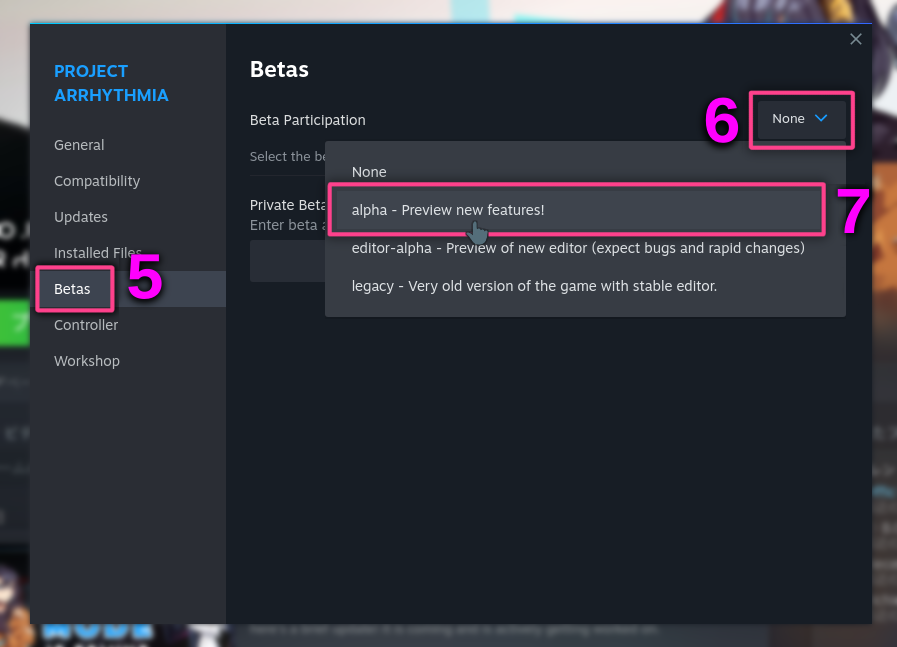
Switch to the mono beta to create the level. The process is described in my Steam Guide on Beta branches:
Summary
- Close Project Arrhythmia if it is open.
- Go to your Steam Library.
- Right click on Project Arrhythmia in the left panel.
- Click “Properties…”
- In the new window, open “Betas” tab.
- Click on the dropdown menu.
- Choose mono beta branch.
- Close the properties window.
- Wait for Steam to finish downloading an update.
Done!
You can create the level there and then switch back to your preferred beta and load the project.
Using BepInEx mod loader
If the previous method is too tedious, another workaround is to install BepInEx. Not exactly sure why, but just having the game modded—even if it’s just BepInEx and nothing else—seems to help with this issue. Installation instructions provided in Aiden’s PAMultiplayer mod page, but here’s a quick summary:
Summary
- Download BepInEx 6.0.0 for Microsoft Windows (amd64)
- Extract the contents of the downloaded archive into your game’s folder. Make sure you’re extracting into the Project Arrhythmia folder, not a subfolder!
- Start the game. You should see a terminal window open first, which indicates that you installed BepInEx successfully. Now if you create a level the game shouldn’t crash.
Do note that it will take a bit longer to start the game every time there is an update.
I made this post to help poor souls searching for a fix online. Hope this gets picked up by search engines!

